Managing Projects
A project is a group of an organization’s APIs and domains. A single API or domain can belong to multiple projects. Only SmartBear administrators and Organization Owners can add APIs to a project in the Swagger Catalog.
Adding Projects
When you create, import, or fork definitions into an organization, you have the option to add this definition to an existing project or a new project.
Note
You can now add MCP and A2A API specification types to a new or an existing project.
To add APIs to an existing project, do the following:
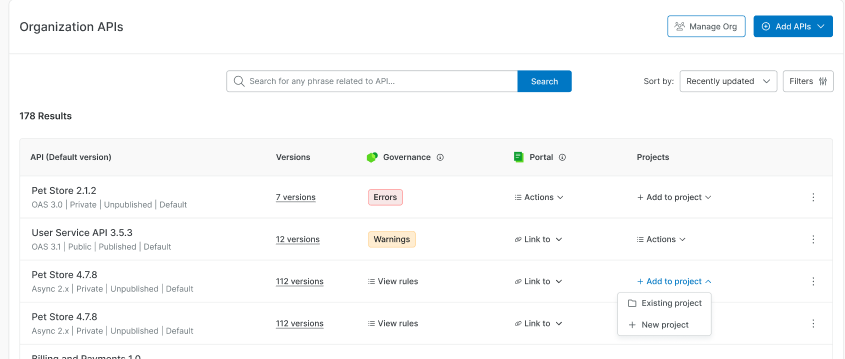
In the Organization API screen, under Project, click Add to Project.
Select the Existing Project option.
The Add API to the existing project dialog box appears.
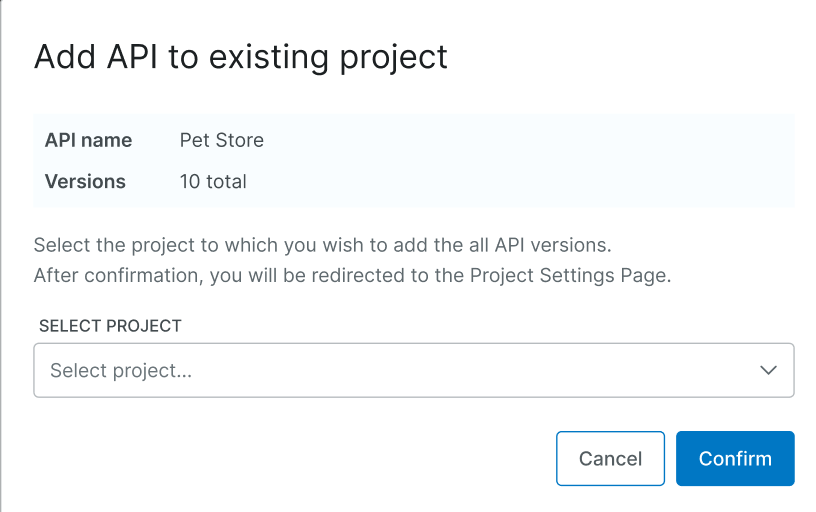
Select the required project from the Select Project list.
Click Confirm.
The API is added to the project, and you are navigated to the Swagger Studio project settings page. See Project Settings to add and delete APIs and domains from projects.
Tip
Adding an API that is already linked to another project Swagger Catalog displays a warning. It is recommended to link each API to a single project to ensure Swagger features work efficiently.
You can create new projects, link them with APIs and domains , or invite members to add users to the project in Swagger Catalog
Understanding Project Status
The following are the available project statuses:
Status | Description |
|---|---|
View | Appears after adding an API to the project. Only users with the required permissions can view the project. |
No Projects | Appears when no API is added to any projects. The user does not have permissions to add an API. |
No Permissions | The user does not have access to the project. To gain access, they need to upgrade their plan. |
Working with Projects
You can view or edit an API, preview its details, or open it in Swagger Explore. See Swagger Explore documentation for more information. To perform these actions, do the following:
Note
The available filters display only supported specification versions. For example, you see AsyncAPI 3.0.0 and OpenAPI 3.2.0 as filter options, not version ranges such as 3.x.x or 3.2.x.
Click the View
 Icon to view an API. The API details appear in the right pane.
Click Open in Editor
 icon to write, edit, and preview your API definitions in real time. You are navigated to Swagger Studio Code Editor.
Click Generate MCP Server
 icon to generate an MCP server for the API definitions. See Generating MCP Server.
Filtering APIs by Project
You can now view the Organization APIs list for the APIs linked to a single project. To filter APIs by project, do the following:
On the Organization APIs page, click Filters.
In the filters pane, under Project, click Select project.
In the project list, enter a project name in the search box, or scroll to find it.
Note
The project list displays only the projects you have permission to view.
Select the project.
The results display only the APIs linked to that project, and the project name appears under Project.
To remove the filter, click Clear next to Project, or click Clear filters to reset all filters.
Note
Refer to Swagger Studio documentation for an overview of user roles and the resource access for each role.